Assignment Operators or C++ Shorthands – Assignment Operators are the operators which are used to assign the values of variables. Assignment Operators are divided into two categories –
- Simple Assignment Operator
- Compound Assignment Operator
Simple Assignment Operator –
The simple assignment Operator is (=), and is used to assign or initialize the value of the variables. For example, Result = 85 ; // means that 85 is initialized to the variable ‘Result’Compound Assignment Operators –
Compound Assignment Operators are also called C++ Shorthands . Because they simplify the coding of a certain type of assignment statement. Syntax : var operator = expression It is same as var = var operator expression There are various types of Assignment Operator –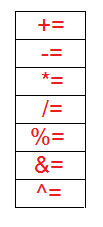 Following table shows the examples of all Compound Assignment Operator –
| += | value += 10 | This is same as value = value + 10 |
| -= | value -= 10 | This is same as value = value – 10 |
| *= | value *= 10 | This is same as value = value * 10 |
| /+ | value /= 10 | This is same as value = value / 10 |
| %= | value %= 10 | This is same as value = value % 10 |
| &= | value&=10 | This is same as value = value & 10 |
| ^= | Value^=10 | This is same as value = value^10 |
#include<iostream.h>
int main()
   {
   int num = 200 ; //Assignment Operator
               // compound assignment Operators
   num += 10;
   cout<<"\nvalue of num after += shorthand="<<num;
   num = 200 ;
   num -= 10;
   cout<<"\nvalue of num after -= shorthand="<<num;
   num = 200 ;
   num *= 10;
   cout<<"\nvalue of num after *= shorthand="<<num;
   num = 200 ;
   num /= 10;
   cout<<"\nvalue of num after /= shorthand="<<num;
   num = 200 ;
   num %= 10;
   cout<<"\nvalue of num after %= shorthand="<<num;
   num = 200 ;
   num &= 10;
   cout<<"\nvalue of num after &= shorthand="<<num;
   num = 200 ;
   num ^= 10;
   cout<<"\nvalue of num after ^= shorthand="<<num;
   return 0;
   }
Output :
value of num after += shorthand=210
value of num after -= shorthand=190
value of num after *= shorthand=2000
value of num after /= shorthand=20
value of num after %= shorthand=0
value of num after &= shorthand=8
value of num after ^= shorthand=194
]]>